Design Guide
Design guide
The rules that keep the world, the look and the words consistent across Hoshimado itself and every work it makes.
The color and spacing samples are drawn straight from the values this site actually uses (tokens.css). Change the guide, and this page changes with it.
01Rules
Rules of the world
Everything Hoshimado expresses rests on these four rules.
- 01
A lit window means someone is inside.
You cannot see in, but the light tells you. There is always a maker inside the window called Hoshimado. So the maker's name is never hidden.
- 02
No one can see inside a star. Only its light reaches us.
We cannot touch what is inside another person. All we see is the light of how they act. Even so, we cannot help sensing someone beyond it.
- 03
Value lies not in the stars, but in the lines between them.
A constellation only exists once the lines are drawn. Value lives in relationships, and lines take time to draw.
- 04
A star whose light has gone out is not gone. It is only asleep.
Each work is a star. A work that has stopped has not ended; it is sleeping. It can be lit again at any time.
Brand words
A window is lit. Someone is inside.
On a night when AI can make anything, Hoshimado lights stars from a window with a maker inside.
Words we don't useCutting-edgeRevolutionaryChange the future
02Principles
Three principles
The rules of the world, turned into everyday design decisions. When in doubt, check against these three.
Transparency
Don't hide what we are doing. Put both what we can and cannot do into words, and show them.
Write "Your files are never sent anywhere" in one sentence, somewhere prominent on screen (only for works where that is true).
Quiet
Calm like the night sky, never rushing anyone. Only one point of emphasis per screen.
One primary button, one glow. No countdowns or blinking to hurry people along.
Accumulation
A comfort that makes people want to open a work every day, rather than a one-time flash. Every work sits under the same night sky.
However many works there are, the "by Hoshimado" in the footer and the voice stay the same.
03Structure
Brand structure
People find their way from a work to Hoshimado, and from Hoshimado to the maker. In the end, trust and relationships gather around the maker as a person; Hoshimado is the window to that person.
| Layer | Examples | Role | Name and color |
|---|---|---|---|
| Trunk: the maker | takumihiguchi.com, note, X | Writing about how things are made and what the maker thinks | The maker's name, and the look of the maker's own site |
| Branch: Hoshimado | This site | The window that shows the works and the world | The colors and logo in this guide |
| Leaves: the works | papatto, YUNA | Where people come in and use things | Each work's own name and colors, signed "by Hoshimado" |
Trunk: the maker
- Examples
- takumihiguchi.com, note, X
- Role
- Writing about how things are made and what the maker thinks
- Name and color
- The maker's name, and the look of the maker's own site
Branch: Hoshimado
- Examples
- This site
- Role
- The window that shows the works and the world
- Name and color
- The colors and logo in this guide
Leaves: the works
- Examples
- papatto, YUNA
- Role
- Where people come in and use things
- Name and color
- Each work's own name and colors, signed "by Hoshimado"
- Don't repaint works in Hoshimado's colors. If you are unsure about colors for a new work, it is fine to start from the colors in this guide.
- Every work follows this guide for its voice and accessibility.
04Voice
Voice
- Write in plain, friendly English. Not too formal: write the way you would explain something to a friend. Use sentence case for headings and buttons.
- Write only facts and promises we can keep. No unfounded superlatives and no promises we cannot guarantee.
- No exclamation marks or emoji in the UI. Only when a character is speaking does its own way of talking come first.
- Buttons start with a verb ("Save", "Get started"). For errors, write one sentence for what happened and one for what to do.
- Use numerals for numbers. Write dates as "October 28, 2026" and times as "6:30".
Words of this world
On the site, we use the terms below. Inside a work's own screens, that work's words come first.
| Ordinary term | Hoshimado term | English heading |
|---|---|---|
| Hoshimado (the brand, this site) | Window | |
| Works, list of works | Stars | Works |
| Philosophy, worldview | About this world | Rules |
| Author, operator | The person inside the window | Creator |
| Relationship with users, connection | Lines |
Hoshimado (the brand, this site)
- Hoshimado term
- Window
Works, list of works
- Hoshimado term
- Stars
- English heading
- Works
Philosophy, worldview
- Hoshimado term
- About this world
- English heading
- Rules
Author, operator
- Hoshimado term
- The person inside the window
- English heading
- Creator
Relationship with users, connection
- Hoshimado term
- Lines
Write / don't write
Privacy
Write
Your files are never sent anywhere. Everything happens inside this browser.
Don't write
Industry-leading security keeps your data completely safe!
Errors
Write
We couldn't save this. You might be offline. Please try again.
Don't write
An error occurred (code 500)
Pausing a work
Write
papatto is paused for now. We'll let you know when it starts again.
Don't write
This service has been discontinued.
Writing the name
- Always write Hoshimado, with only the first letter capitalized.
- All capitals are used only for small English headings in the caption style.
05Logo
The logo and the lit window
The logo is a window frame with rounded corners, and the four-pointed star formed by its crossbars. The window's own lattice is the star: that is the mark of Hoshimado.





Usage
- Use the navy file (brand-night) on light surfaces and the starlight file (brand-starlight) on dark ones. Don't recolor it with CSS (the only exception is the by Hoshimado signature; see chapter 6).
- Leave at least 1/4 of the mark's height clear on all four sides.
- The minimum size is 16px for the mark alone and 96px wide for the horizontal logo. Anywhere smaller, use the mark alone.
- Always use the files. Don't rebuild the logo in HTML or another typeface.
Don't
Don't rotate it
Don't stretch or squash it
Don't add shadows or outlines
Don't use colors other than navy and starlight
The lit window
A way of drawing the mark as a window with its light on. Use it only where the brand is saying "someone is here": on a night surface, small, and only once.
06Endorsement
by Hoshimado
Hoshimado's signature, placed in the sites and apps of its works. It aims to leave each work's world intact while still showing that the same maker is behind it.
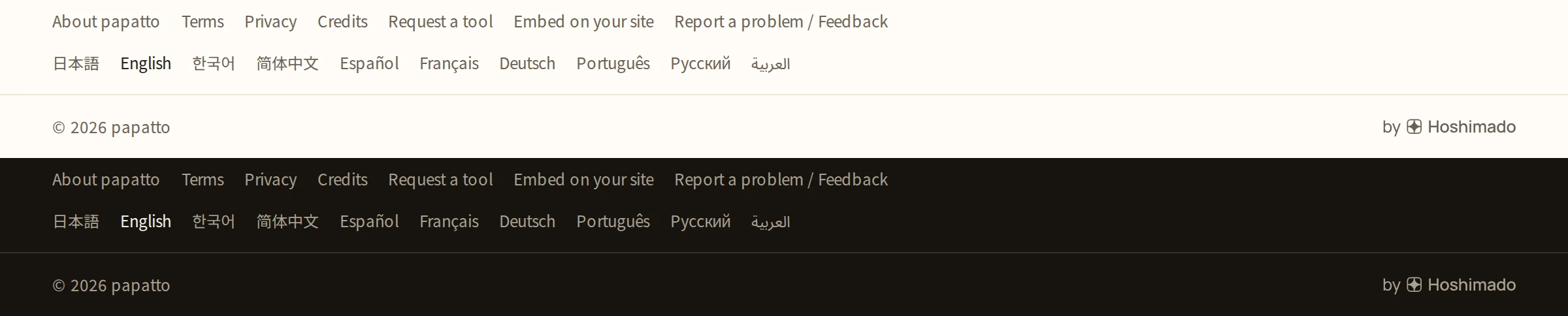
- This signature is the only part of the logo whose color may change. Fill it with a single color, the work's own muted text color, and don't bring in Hoshimado's navy or the work's accent color.
- Place it at the right end of the footer's bottom line (the copyright line). Match the signature's letter height to the copyright text beside it (about 16–20px tall), and never make it larger than body text.
- Link it to the Hoshimado site, opening in a new tab.
- Don't put it in the header, make it larger than the work's logo or set it side by side like a co-brand.
Signature files (SVG)



07Color
Color
Night navy and starlight white are the face of the brand, with a little window lamplight, interactive blue and star gold added. The Hoshimado site is built on the night surface only, and always uses the Dark token values. Light is for works where daytime comes first, such as papatto.
Night
The night sky in the first view, full dark surfaces, the logo and text on light surfaces, large areas of color.
brand-void#03050dbrand-deep#070c1fbrand-night#101a3abrand-twilight#22346e
Starlight, lamp and star glow
starlight is for the logo and text on dark surfaces. lamp is only for the glass of the lit window. glow is the one point of emphasis per screen.
brand-starlight#f6f1e4lamp#f2c879glow#e8c277glow-inkLight#8a64174.9:1 against backgroundDark#e8c27711.1:1 against background
Backgrounds
Page / cards and dialogs / bands and code.
surfaceLight#f7f5efDark#0b1024surface-raisedLight#ffffffDark#141c3asurface-sunkenLight#efece3Dark#070c1f
Text
Body and headings / supporting text / notes. Each meets 4.5:1 or more on all three backgrounds.
inkLight#101a3a15.6:1 against backgroundDark#f6f1e416.7:1 against backgroundink-secondaryLight#4a55786.7:1 against backgroundDark#b7bccf10:1 against backgroundink-mutedLight#5f67845.1:1 against backgroundDark#8a93ad6.2:1 against background
Borders and controls
Borders are for decorative dividers and the outlines of inputs and buttons. accent is only for links, primary buttons, selection and focus.
borderLight#d9d5caDark#262f57border-controlLight#7e869eDark#66709baccentLight#3d5bd95.2:1 against backgroundDark#8fa6ff8.1:1 against backgroundon-accentLight#ffffffDark#0b1024
States
Success / warning / error. Always pair with words or an icon.
successLight#1c70495.6:1 against backgroundDark#5cc5938.9:1 against backgroundwarningLight#8f5c0e5.2:1 against backgroundDark#e8b04b9.6:1 against backgrounddangerLight#b93a365.2:1 against backgroundDark#f07c767:1 against background
Proportions
On night surfaces, roughly 80% is brand-void and brand-deep, a little under 20% is text (the ink colors), and 10% or less is accent. lamp and glow are points, not areas, used only once per screen.
What we don't use
accent as decoration
lamp or glow painted over large areas
Blue-purple gradients, neon or flashy nebula illustrations
08Typography
Type
Manrope for Latin text, Noto Sans JP for Japanese and Noto Sans SC for Chinese. Sizes and line heights come only from the 12 styles below.
statement52 / 72px, 600A line that speaks of the world. The opening of RulesA window is lit.
display48 / 56px, 600Large English headingsWorks
title-132 / 44px, 600Page headingspapatto
title-224 / 34px, 600Section headings92 tools, one feel
title-318 / 28px, 600Headings for cards and small groupsInformation
body16 / 28px, 400Body textConvert images and tidy up text, entirely inside your browser.
body-sm14 / 24px, 400Supporting text, tables, metadataYour files are never sent anywhere.
label14 / 20px, 600Buttons, tabs, form labelsSave
caption12 / 18px, 500Notes, badges, small English headingsComing soon
code14 / 22px, 400Code, file names, IDssrc/styles/tokens.css
phrase22–32 / 1.9 (scales with screen width), 500A line that sets a scene (Rules and Creator on the site)Join the stars you choose, and draw a constellation of your own
prose14 / 2.1, 400Paragraphs meant to be read. Line height is opened up for easy readingYou choose the stars you can rely on, and you connect them. The constellation you make becomes the shape of what is useful to you, and what you like, in your everyday life.
- Manrope for Latin text. Japanese pages use Noto Sans JP and Chinese pages use Noto Sans SC. Numerals always stay in Manrope.
- Say things in one large line, and keep explanations short beside it. Don't pair a heading, a description and a button every time.
- Keep body line height generous (1.75 for body, 2.1 for prose paragraphs). Keep lines to about 60–75 characters (measure).
- Sizes and line heights come only from these 12 styles. Don't override them individually on a page.
- Create emphasis with size and space, not with lots of bold.
09Layout
Layout, spacing and corners
Spacing works in units of 4px, with a limited set of steps. Side margins are space-4 on phones and space-12 on wide screens.
Spacing steps
space-2 to 4 inside parts, space-4 to 6 between parts, space-16 or more between sections. When in doubt, go one step wider.
space-14pxspace-28pxInside parts. Between a label and its fieldspace-312pxInside partsspace-416pxInside and between parts. Side margins on phonesspace-624pxBetween parts. Between form fieldsspace-832pxBetween the last form field and the primary buttonspace-1248pxSide margins on wide screensspace-1664pxBetween sections (at least this)
Corner radius
Buttons and inputs use radius-md. Frames for photos and video have square corners.
radius-sm6pxSmall marksradius-md10pxButtons, inputsradius-lg16pxLarge partsradius-xl24pxDialogsradius-window22%Icon-style tiles (same as the logo's window frame)radius-pill999pxSearch fields only
Composition
- Show the list of works as tiles, filled edge to edge with each work's video. Lay the name over the bottom left of the tile and darken the bottom so it stays readable. Don't wrap them in card borders or shadows.
- On work detail pages, put photos and video in 16:10 frames, and the opening video full width.
- Divide sections with a single 1px border line on top. Leave space-16 or more after the line.
- Body width tops out at content-max (1120px); reading text wraps at measure.
- Don't round the corners of photo or video frames. When in doubt, make the spacing one step wider.
10Motion
Light and motion
Motion shows how time flows in this world. Slowly, easing out, never bouncing.
Hoshimado's three motions
Timing
| Token | Duration | Used for |
|---|---|---|
| duration-fast | 120ms | Hover and press |
| duration-base | 220ms | Opening, closing and fades |
| duration-slow | 480ms | Brand moments only |
| duration-lamp | 3200ms | A light comes on (once per page) |
| duration-line | 1400ms | Drawing one constellation line |
| duration-twinkle | 7000ms | The twinkle cycle of a star |
duration-fast
- Duration
- 120ms
- Used for
- Hover and press
duration-base
- Duration
- 220ms
- Used for
- Opening, closing and fades
duration-slow
- Duration
- 480ms
- Used for
- Brand moments only
duration-lamp
- Duration
- 3200ms
- Used for
- A light comes on (once per page)
duration-line
- Duration
- 1400ms
- Used for
- Drawing one constellation line
duration-twinkle
- Duration
- 7000ms
- Used for
- The twinkle cycle of a star
Light
By day, shadow-sm (cards) and shadow-lg (dialogs, menus) lift things off the page. By night, the same tokens turn into faint outlines and light.
Light (window by day)
shadow-smshadow-lgshadow-glowDark (window by night)
shadow-smshadow-lgshadow-glow- Slowly, easing out, never bouncing. No bouncing, shaking or spinning, and no blinking to grab attention.
- The one exception is the first view, where you peek at the works' videos. A mosaic and a band of horizontal noise show that you are looking through a window.
- With reduced motion on, stop every effect and show the lights and lines already in place.
- shadow-glow, like glow, appears only once per screen. shadow-lamp is only for the lit window.
11Forms
Forms
Every input follows the same visual rules. Labels, fields and errors share the same shapes and spacing.
Light (window by day)
Dark (window by night)
- Always place the label above the field. Don't use the placeholder as a label; use it for an example of the input.
- Inputs and selects are 44px tall, with radius-md corners, a surface-raised background and a border-control outline. Text is 16px.
- Since most fields are required, mark the optional ones instead. Don't use a red "*".
- Show errors after the person finishes typing, as one sentence with an icon below the field. Say what is missing and how to fix it.
- Use a toggle for settings that apply right away, radio buttons to pick one of 2–4 options, and a select for 5 or more.
13Imagery
Photos, video and icons
checkxalertsearchdownloadlockmooncopyControls use accent- Show works with video recorded from real screens or streams. Show them in use, as they are, rather than in polished ad footage.
- Photos should be quiet, real things: the actual night sky, windows, the lights of a room. Avoid stock photos with large faces.
- Draw illustrations only with rounded rectangles and arcs, stars as points and 1px lines (constellations). Stars are four-pointed or small dots, nothing else.
- Draw icons with 1.75px lines and rounded ends and corners, on a 24px grid (matching Lucide's shapes). Don't use emoji in place of icons.
14Accessibility
Accessibility
Pair every status mark with words
Focus is a 2px solid line, 2px away
Save- Text meets 4.5:1. Large text (24px or more), icons and the outlines of controls meet 3:1 or more.
- Draw keyboard focus as the 2px solid focus-ring line, 2px away from the element.
- Never convey state with color alone. Marks such as "Live" always come with words.
- Give images alt text that describes their content. The logo's is "Hoshimado". Hide decorative stars and lines from screen readers.
- Make anything people can press at least 44px. When something must be smaller, keep it at least 24px (WCAG 2.2, 2.5.8) and leave enough room around it to avoid mistaps.
- Even if something looks small, its pressable area may be extended with padding. Links within a sentence are exempt.
15Checklist
Before you publish
Check each of these, one by one, before a work or page goes live.
- Nothing contradicts the rules of the world (the maker's name isn't hidden; no promises we can't guarantee)
- Work states are written as "Live / Coming soon / Paused"
- There is only one primary button, one glow and one lit window per screen
- All text colors come from the tokens and meet contrast in both Light and Dark
- Every input has a label, and errors are explained in a sentence, not by color alone
- For a work, "by Hoshimado" is in the footer in the work's muted text color
- Effects stop when reduced motion is on, and this has been checked